Join our newsletter

27 000+ people already joined



Open your Keboola Project → click your Profile icon → Project Settings → navigate to Kai Assistant → type your preferences into "Custom Instructions" → save.
Done. Every future conversation follows your rules.
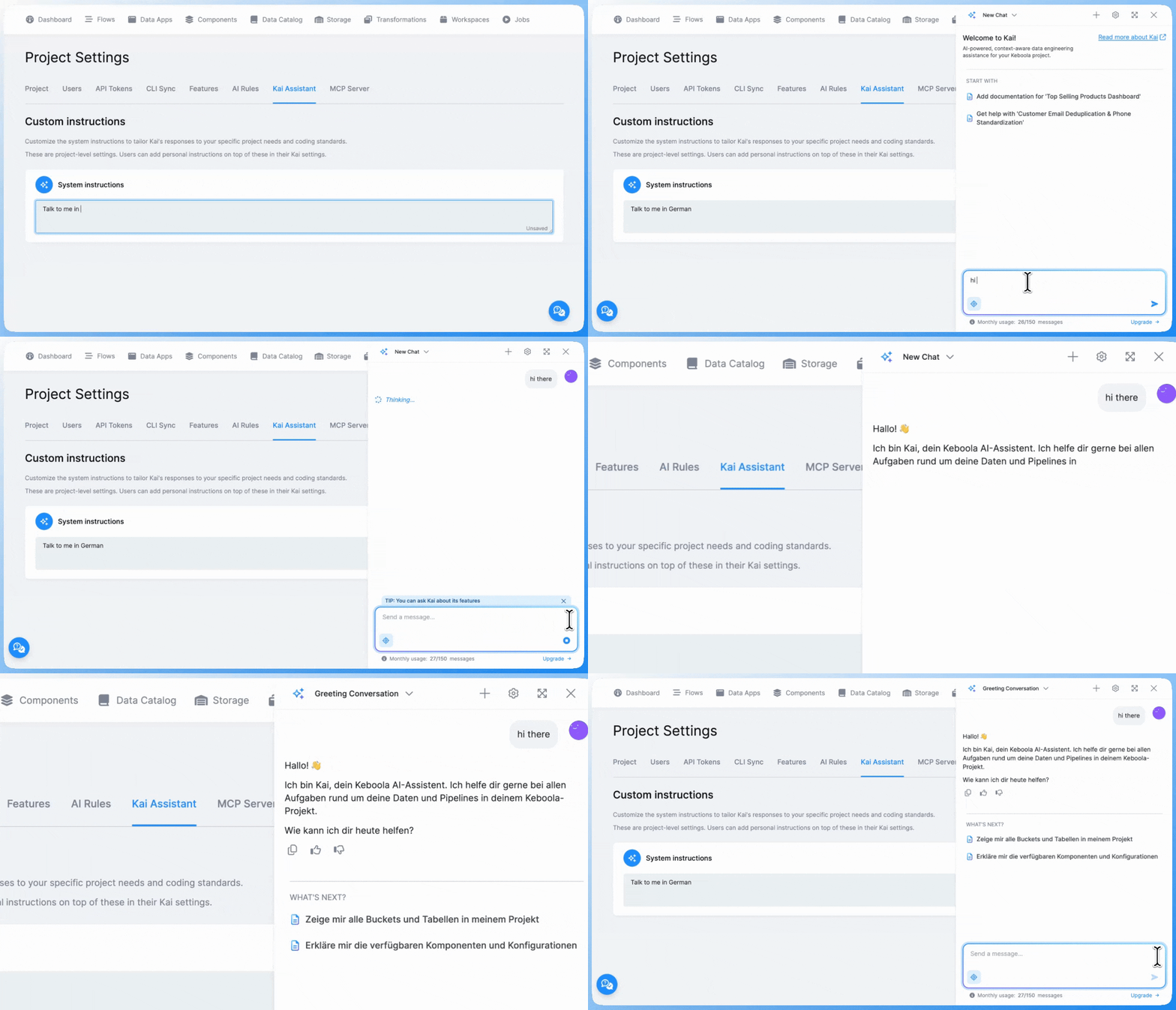
Open Kai Chat → click Settings icon (⚙️)→ navigate to "System instructions" and save. Now Kai know your preferences.
Stack preferences: "Always use dbt for SQL transformations. Never create native Snowflake transformations."
Naming conventions: "All tables must start with 'fact_' or 'dim_'. Column names lowercase with underscores."
Language: "Write SQL comments in Spanish and use Spanish variable names."
Documentation: "Include a header with purpose, author, and last modified date in all transformations."
Data privacy: "Never include PII in transformations. Always hash email addresses and mask phone numbers."
Be specific. "All table names lowercase with underscores, prefixed fact_ or dim_" beats "use good naming conventions."
Include your tools. "Use dbt for transformations, Python 3.11 for Python code."
Set your style. "SQL in uppercase, 2-space indentation."
"Always use dbt for SQL transformations. All table names must be lowercase with underscores. Prefix staging tables with 'stg_', intermediate tables with 'int_', and final tables with 'fact_' or 'dim_'. Include documentation in YAML files for all models."
"Write all SQL queries with keywords in uppercase. Use 2-space indentation. Always include column aliases for readability. Add comments explaining business logic."
"Write all code comments and documentation in German. Use German variable names where appropriate. Follow German data privacy regulations (GDPR) in all transformations."
Custom Instructions are available now for all Kai users.
Open Kai, click settings, and start defining your preferences. In 5 minutes, you'll have standards that apply to every future conversation.

Give Kai persistent preferences that apply across every chat. Set your standards once - on project or user level.




.png)